Business operations increasingly depend on digital accounts. Employees use online email platforms, cloud storage, accounting applications, customer relationship management systems, project management tools, banking services and internal business portals. These platforms contain information that is valuable to both organisations and cybercriminals. Access to a single compromised account can sometimes expose confidential documents, customer records, financial information or business communications.
Passwords have traditionally been the primary method of protecting these accounts. However, passwords alone are no longer sufficient for many business environments. People reuse passwords across websites, choose predictable combinations, store credentials insecurely or accidentally disclose them through phishing attacks. Data breaches can also expose login credentials, allowing attackers to attempt access to other services.
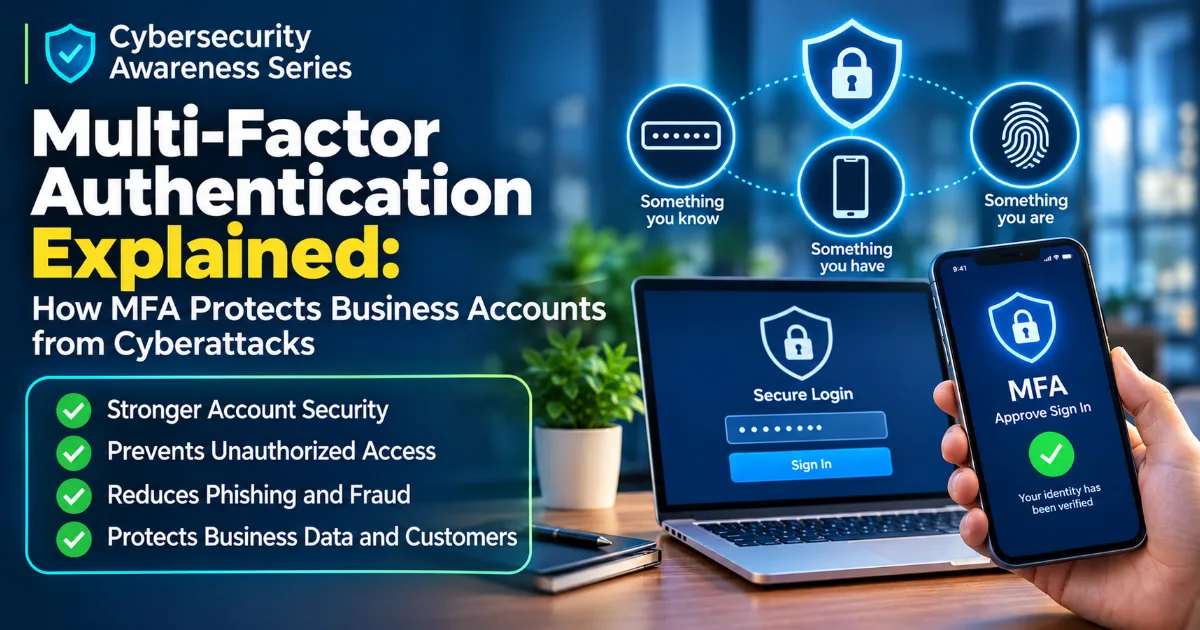
Multi-Factor Authentication, commonly known as MFA, provides an additional layer of account protection. Instead of relying only on a password, MFA requires users to verify their identity through two or more different authentication factors. These factors may involve something a person knows, something they possess or something they are.
For example, an employee may enter a password and then confirm the login through an authenticator application or a physical security key. Even if an attacker obtains the password, the additional authentication requirement can prevent access.
MFA is one of the most practical security measures businesses can adopt to reduce the risk of unauthorised account access. It is particularly important for email accounts, administrator accounts, cloud platforms, remote access systems and applications containing sensitive information.
Continue Reading
This article explains how multi-factor authentication works, the different authentication methods available, the threats it helps address, its limitations and how businesses can implement it effectively.
What Is Multi-Factor Authentication?
Multi-Factor Authentication is an identity verification method that requires a user to provide evidence from at least two different authentication factor categories before access is granted.
The purpose is to make account access depend on more than one type of proof. A password can be stolen, guessed or exposed in a data breach. A second factor introduces another requirement that an attacker must also overcome.
Authentication factors generally fall into three categories.
Something You Know
This factor refers to information that only the legitimate user should know. Common examples include passwords, PINs and passphrases.
Passwords remain widely used because they are easy to deploy and familiar to users. However, they can be compromised through phishing, credential stuffing, keylogging, password reuse and social engineering.
A password is useful as an authentication factor, but businesses should avoid depending on it as the only protection for important accounts.
Something You Have
This factor refers to a physical or digital item controlled by the user. Examples include a registered smartphone, hardware security key, smart card or authenticator device.
An employee may enter a password and then approve a sign-in through an authenticator application on a registered phone. Alternatively, the employee may connect a hardware security key to the computer.
The additional requirement makes it harder for an attacker who has only stolen the password to access the account.
Something You Are
This factor uses biometric characteristics associated with the user. Examples include fingerprints, facial recognition and other biometric verification methods supported by a device.
Biometric authentication can make access convenient because users do not need to remember another password or manually enter a code. However, organisations must consider privacy, device security, recovery procedures and the technical implementation of biometric systems.
Biometric verification is often performed locally on a device, with the device using the result to authorise access. Businesses should understand how the particular technology stores and processes biometric information.
How MFA Works
A typical MFA login involves several stages.
First, the user enters their username and password. The system checks whether the credentials are valid. If the first factor is accepted, the system requests another form of verification.
The user may approve a notification on a registered authenticator application, enter a time-based one-time password, use a security key or complete an approved biometric verification process.
The authentication system validates the second factor. If the required checks succeed, access is granted according to the account's permissions and applicable security policies.
For example, imagine an employee signing in to a company's cloud document platform. The employee enters the correct password, but the platform also requires a time-based code from a registered authenticator application. An attacker who has obtained the password but does not control the registered authentication device will have greater difficulty completing the login.
Some systems also use risk-based authentication. They may request additional verification when a login comes from an unfamiliar device, an unusual location or a suspicious session. This allows organisations to apply stronger checks when the circumstances indicate increased risk.
MFA does not mean that every login must involve the same number of steps in every situation. Authentication requirements can depend on the application's sensitivity, the device, the user's role and the organisation's security policies.
Why Passwords Alone Are Not Enough
Passwords are vulnerable because they depend heavily on user behaviour and the security of the services where they are used.
Password Reuse
Many people reuse the same password across several websites and applications. If one service experiences a data breach, attackers may try the exposed credentials against other platforms.
This technique is known as credential stuffing. Automated tools can test large collections of stolen usernames and passwords against popular services.
MFA makes successful account takeover more difficult because possession of a valid password may not be enough to complete authentication.
Phishing Attacks
Phishing messages attempt to trick users into entering credentials on fraudulent websites or approving malicious requests.
An employee may receive an email that appears to come from a familiar cloud service. The message claims that a shared document requires attention and directs the employee to a fake sign-in page.
If the employee enters a password, the attacker may capture it and immediately attempt to access the real account.
MFA can reduce the risk, but not every MFA method provides equal protection against phishing. Some methods, especially codes that users manually enter, can be intercepted or relayed through real-time phishing websites. Phishing-resistant methods such as properly configured FIDO2 security keys and passkeys provide stronger protection.
Weak and Predictable Passwords
Passwords based on names, birthdays, common words or predictable patterns can be easier to guess.
Attackers may use automated password-guessing tools and lists of commonly used passwords. Even a password that appears complicated may be vulnerable if it has been reused or exposed.
MFA provides an additional barrier, although businesses should still encourage strong, unique passwords and approved password management practices.
Data Breaches
When a service provider experiences a security incident, stored credentials may be exposed depending on the nature of the breach and the provider's security controls.
Users who reuse the affected password on other platforms may become vulnerable elsewhere.
MFA helps reduce the chance that an exposed password alone will provide access to an account.
Common Types of Multi-Factor Authentication
Businesses can choose from several MFA methods. Each has different security, usability, cost and deployment characteristics.
Authenticator Applications
Authenticator applications generate temporary verification codes or approve authentication requests.
A common method is Time-Based One-Time Password authentication, known as TOTP. The application generates a short code that changes at regular intervals. The user enters the code after providing a password.
The code is generated using a shared secret and the current time. The authentication service checks whether the submitted code matches the expected value within the permitted time window.
Authenticator applications can work without a continuous internet connection after registration, depending on the implementation. They are generally more secure than relying on passwords alone and are widely supported by business applications.
However, users must protect the device and the application's recovery information. If a phone is lost, damaged or replaced, the organisation needs a secure account recovery process.
Push Notification Authentication
Push authentication sends a sign-in approval request to a registered device. The user receives a notification and confirms or rejects the request.
This method can be convenient because employees do not need to manually enter a code.
However, repeated unexpected approval requests can be used in MFA fatigue attacks. In these attacks, an attacker repeatedly triggers authentication prompts in the hope that the user will approve one out of frustration or confusion.
Businesses should use number matching or other contextual verification features where available. Employees must be trained never to approve requests they did not initiate.
SMS One-Time Passwords
SMS-based MFA sends a temporary code to a registered mobile number. The user enters that code during login.
SMS is familiar and easy to deploy, especially for organisations beginning their MFA programme. However, it has security limitations.
Attackers may exploit SIM swapping, social engineering against mobile providers, message interception or compromised devices. SMS codes can also be captured by phishing websites.
Businesses should generally prefer stronger methods for administrators, financial systems and sensitive information. SMS may serve as a transitional or fallback option where stronger methods are not available, but it should not be treated as the strongest authentication method.
Email Verification Codes
Some systems send temporary authentication codes to a registered email address.
This can add a verification step, but its security depends on the protection of the email account itself. If the attacker already controls the email account, the additional factor may provide little meaningful protection.
Email verification can be convenient in certain environments, but organisations should evaluate whether it genuinely provides an independent authentication factor.
Hardware Security Keys
Hardware security keys are physical devices used to authenticate users. They commonly support standards such as FIDO2 and WebAuthn.
A user connects the key through USB, NFC or another supported method and completes the authentication process. Depending on the device and platform, the user may also need a PIN or biometric verification.
Hardware security keys are particularly useful for administrators, executives, developers and employees with access to sensitive systems.
When correctly implemented, FIDO-based authentication is designed to resist phishing by binding authentication to the legitimate website or service origin. This makes it significantly harder for a fraudulent website to capture a reusable authentication response.
Organisations should consider issuing backup security keys and establishing secure registration and replacement procedures.
Passkeys
Passkeys are a modern authentication method based on public-key cryptography and supported by the FIDO standards ecosystem.
A passkey uses a cryptographic key pair. The private key remains protected by the user's device or credential manager, while the corresponding public key is registered with the service.
When the user signs in, the service sends a challenge that the device signs using the private key. The user may unlock the credential using a device PIN, fingerprint or facial recognition.
Passkeys can provide phishing-resistant authentication because the credential is associated with the legitimate service rather than a password that can be entered on any website.
Businesses should understand how passkeys are managed, synchronised, recovered and revoked across their chosen platforms.
Biometric Authentication
Biometric authentication uses physical characteristics such as fingerprints or facial recognition.
It is often used to unlock a device or authorise access to a passkey. The biometric check may be handled locally by the device, while the resulting authentication credential is used to access the business service.
Biometrics can improve convenience, but they should be implemented with appropriate privacy and security safeguards. Organisations should avoid assuming that biometric information can be changed as easily as a password if it is compromised.
MFA, Two-Factor Authentication and Two-Step Verification: What Is the Difference?
These terms are related but do not always mean exactly the same thing.
Two-Factor Authentication, or 2FA, requires two different authentication factor categories. For example, a password combined with a registered hardware security key represents two factors.
Multi-Factor Authentication is the broader term for authentication requiring two or more different factor categories. Two-factor authentication is therefore a type of MFA.
Two-step verification describes a process involving two separate verification steps. However, the steps may not always represent two independent factor categories. For example, a password followed by a security question may involve two pieces of information that both belong to the knowledge category.
This distinction matters because two steps do not automatically provide two independent authentication factors.
Businesses should evaluate the actual authentication design rather than relying only on the label used by a software provider.
Cyberattacks That MFA Helps Prevent
MFA is particularly valuable against attacks that depend on obtaining or guessing user credentials. It cannot prevent every cyberattack, but it can make several common attack techniques more difficult.
Credential Stuffing
Credential stuffing uses previously exposed username and password combinations to attempt access to other services.
If an employee reused a password exposed in an unrelated breach, an attacker may test it against the company's email or cloud applications.
MFA introduces an additional requirement, making it harder to gain access using the stolen password alone.
Password Spraying
Password spraying involves attempting a small number of commonly used passwords against many accounts. This approach is designed to avoid triggering account lockouts associated with repeatedly guessing one account.
MFA reduces the likelihood that a successful password guess will automatically lead to account compromise.
Phishing-Based Account Takeover
MFA can prevent many attacks where the attacker only obtains a password. However, attackers may use real-time phishing proxies to capture credentials and relay certain MFA codes or authentication sessions.
This is why businesses should consider phishing-resistant authentication methods for high-risk accounts.
Brute-Force Password Attacks
Brute-force attacks attempt large numbers of password combinations to discover valid credentials.
MFA provides another security layer after password validation. Organisations should still use rate limiting, account protection, strong password policies and monitoring to reduce automated login attacks.
Unauthorised Remote Access
Remote access services can be attractive targets because they provide a route into business environments.
Requiring MFA for remote access, administrative portals and sensitive applications can reduce the risk associated with stolen credentials.
Account Takeover Through Social Engineering
Attackers may impersonate IT support employees, managers or service providers to persuade users to reveal passwords or approve login requests.
MFA helps, but employees must understand that they should never share verification codes or approve unexpected authentication requests.
Understanding MFA Fatigue Attacks
MFA fatigue, sometimes called push bombing, is an attack technique in which a criminal repeatedly triggers authentication notifications for a target account.
The attacker may already have the correct password. They then send repeated approval requests to the victim's registered device.
The objective is to make the user tired, confused or frustrated enough to approve one request. In some cases, the attacker may contact the employee and falsely claim that the notifications are part of a legitimate IT process.
Businesses can reduce this risk by using number matching, displaying contextual information in approval prompts, limiting repeated requests and monitoring unusual authentication patterns.
Employees should be instructed to deny unexpected requests and report them immediately. An unexpected authentication notification should be treated as a possible indication that someone knows the user's password.
The Limitations of Multi-Factor Authentication
MFA is highly valuable, but it should not be considered a complete cybersecurity solution.
Not All MFA Methods Are Equally Secure
SMS codes, email codes, push approvals, authenticator codes, passkeys and hardware security keys have different security characteristics.
A method that protects against password-only attacks may still be vulnerable to phishing or social engineering.
Businesses should select authentication methods according to the sensitivity of the system and the risk profile of its users.
Session Hijacking
An attacker may attempt to steal an authenticated session rather than directly compromise the login process.
If a valid session token is stolen, the attacker may be able to access a service without repeating the original authentication process.
Organisations should protect endpoints, use secure session management, monitor unusual activity and revoke sessions when compromise is suspected.
Compromised Devices
If a user's device is infected with malware or controlled by an attacker, the attacker may attempt to interfere with authentication processes or access information after login.
MFA should therefore be combined with endpoint protection, device security requirements and monitoring.
Social Engineering
Criminals may trick employees into approving authentication requests, revealing codes or registering an attacker's device.
Security awareness training and clear reporting procedures remain important.
Account Recovery Weaknesses
An organisation may have strong MFA during normal login but weak recovery procedures.
For example, an attacker might persuade support staff to reset an account or replace a registered authentication device without adequate verification.
Recovery processes should be designed with the same security seriousness as the main authentication process.
How Businesses Should Implement MFA
A successful MFA programme requires planning, clear policies and reliable user support. Businesses should introduce authentication controls in a way that improves security without unnecessarily disrupting daily operations.
Identify Important Business Accounts
Begin by listing the accounts and applications that require protection.
Prioritise email platforms, administrator accounts, cloud storage, financial systems, remote access services, customer databases, source code repositories and applications containing personal or confidential information.
Email accounts deserve particular attention because they are often used to reset passwords for other services.
Prioritise Privileged Accounts
Administrator accounts can make extensive changes to systems and data. If one is compromised, the attacker may be able to create new accounts, alter permissions, disable security controls or access sensitive resources.
Require strong MFA for all privileged accounts. Consider phishing-resistant methods such as hardware security keys or passkeys where supported.
Administrative users should use separate accounts for ordinary work and privileged activities.
Select Appropriate Authentication Methods
The right MFA method depends on the organisation's applications, users, budget and security requirements.
Authenticator applications may provide a practical starting point for many employees. Hardware security keys and passkeys may be more appropriate for high-risk accounts and privileged users.
Organisations should evaluate whether each method provides adequate protection against the threats they face.
Establish an MFA Policy
A written MFA policy should explain which accounts require MFA, which authentication methods are approved and how users should register and recover their authentication credentials.
It should also define responsibilities for lost devices, suspected compromise, employee departure and access changes.
The policy should identify any exceptions and explain who can approve them.
Prepare Employees Before Rollout
Employees should understand why MFA is being introduced and how to use the selected authentication method.
Training should cover login approval requests, verification codes, phishing attempts, lost devices and suspicious notifications.
Users should know that authentication codes must never be shared with anyone, including people claiming to be IT support.
Provide Secure Backup Methods
A business should not depend on a single phone or authentication device without a recovery plan.
Employees may lose phones, replace devices or become temporarily unable to access their registered authentication method.
Organisations can provide backup security keys, recovery codes or a controlled account recovery process. Recovery information should be stored securely and protected from unauthorised access.
Enforce MFA Consistently
Once the organisation has completed registration and testing, MFA requirements should be enforced for the relevant accounts.
Administrators should review exceptions and identify applications that do not support the chosen authentication method.
Legacy applications may require alternative controls, replacement or additional network restrictions.
Monitor Authentication Activity
Businesses should monitor failed logins, unexpected authentication approvals, repeated MFA prompts, new device registrations and suspicious changes to account recovery settings.
Alerts should be investigated promptly. If an account is suspected of compromise, administrators may need to reset credentials, revoke sessions, remove unauthorised authentication devices and review account activity.
MFA Best Practices for Small Businesses
Small businesses may not have dedicated cybersecurity departments, but they can still establish effective MFA practices.
Start by enabling MFA on business email, cloud storage, financial platforms and administrator accounts. These services often contain valuable information and provide access to other systems.
Use authenticator applications or passkeys where supported, and consider hardware security keys for accounts with extensive privileges.
Avoid shared accounts. Each employee should have an individual identity so that access can be controlled and activity can be attributed appropriately.
Keep recovery methods secure. Do not store backup codes in publicly accessible folders or share them through ordinary chat messages.
Review employee access when someone changes roles or leaves the organisation. Remove registered devices and revoke sessions when necessary.
Finally, provide short, regular security awareness sessions. Employees should know how to recognise suspicious MFA requests and report unexpected login notifications.
Example: How MFA Protects a Company's Email Account
Consider a small business employee who receives an email that appears to come from a cloud storage provider. The message claims that a colleague has shared an important document.
The employee clicks the link and enters the company email password on a fraudulent website. The attacker captures the credentials and attempts to sign in to the real email account.
If the business relies only on passwords, the attacker may gain access immediately if no additional security control blocks the login.
If the account uses authenticator-based MFA, the attacker must also complete the second verification step. Without access to the employee's registered authentication method, the attacker may be unable to complete the sign-in.
If the business uses a phishing-resistant security key or passkey, protection can be stronger because authentication is cryptographically bound to the legitimate service.
The incident should still be reported. The employee should change the compromised password, and the security team should review sign-in activity, revoke suspicious sessions and check whether other accounts may have been affected.
This example demonstrates how MFA can reduce the consequences of a stolen password, while also showing why phishing-resistant methods and incident response remain important.
MFA for Different Business Roles
Not every employee uses the same systems or handles the same level of sensitive information. MFA policies should account for these differences while maintaining a strong baseline.
Business Owners and Executives
Executives may have access to financial information, strategic plans, customer data and important business communications.
Their accounts can be attractive targets for attackers seeking financial fraud, confidential information or impersonation opportunities.
Strong MFA should be required for email, cloud platforms, financial services and administrative access. Phishing-resistant methods are particularly valuable for high-impact accounts.
Finance and Accounting Teams
Finance employees may manage invoices, payment records, bank details and financial approvals.
Compromised accounts can be used to redirect payments, manipulate financial documents or impersonate vendors.
MFA should protect accounting platforms, banking services, email and financial approval systems. Unusual authentication activity and changes to payment-related access should receive appropriate attention.
Developers and IT Administrators
Developers and administrators may have access to source code, production infrastructure, cloud consoles and deployment systems.
These accounts can provide access to systems that are critical for business operations.
Organisations should use strong MFA, separate privileged accounts and review access to development and production environments. Hardware security keys or passkeys can be useful for high-risk identities.
General Employees
Every employee's account can provide an entry point into business systems.
A general employee may have access to customer messages, internal documents, project files or collaboration tools.
MFA should be enabled across the organisation rather than limited only to senior employees or IT teams.
Managing Lost Devices and Account Recovery
A reliable MFA programme must account for situations in which employees lose their phones, replace authentication devices or become unable to complete verification.
If a registered device is lost, the employee should report it through the organisation's approved process. Administrators should assess whether the device may contain active sessions or other business information.
The organisation may need to revoke the lost device's authentication registration, terminate active sessions, review account activity and register a replacement device after verifying the employee's identity.
Recovery should not rely on easily guessed personal information or informal requests through messaging applications. Support staff should follow documented identity verification procedures.
Backup authentication devices can reduce disruption for administrators and other high-risk employees. Recovery codes may also be useful, but they should be stored securely and treated like sensitive credentials.
Businesses should test their recovery procedures before an incident occurs. A strong normal login process is not enough if attackers can bypass it through weak account recovery.
Measuring the Effectiveness of an MFA Programme
Organisations should track whether MFA is being adopted and whether the implementation is reducing account security risks.
Useful measures include the percentage of employee accounts protected by MFA, the percentage of privileged accounts using phishing-resistant authentication and the number of applications that still allow password-only access.
Businesses can also monitor the number of MFA-related support requests, unusual approval attempts, failed authentication events and accounts with outdated recovery information.
Periodic reviews should identify employees who have not completed registration, applications with unsupported authentication methods and exceptions that are no longer justified.
Metrics should be interpreted carefully. A high MFA adoption rate is valuable, but it does not prove that every authentication method is equally secure. Organisations should evaluate both coverage and the quality of the methods being used.
Conclusion
Multi-Factor Authentication is one of the most practical ways to strengthen business account security. Passwords can be stolen, reused, guessed or exposed through phishing attacks and data breaches. Requiring an additional authentication factor makes it more difficult for an attacker to access an account using only a compromised password.
Businesses can choose from authenticator applications, push notifications, SMS codes, hardware security keys, passkeys and biometric verification. These methods offer different levels of protection, convenience and resistance to phishing. High-risk accounts should use stronger, phishing-resistant methods wherever practical.
An effective MFA programme requires more than switching on a setting. Organisations should identify critical accounts, prioritise administrators, select suitable authentication methods, train employees, establish secure recovery procedures and monitor suspicious activity.
MFA should also be combined with strong passwords, least-privilege permissions, device protection, secure application configurations and incident response planning. It cannot prevent every cyberattack, but it can significantly reduce the risk that stolen credentials will lead directly to unauthorised access.
As businesses continue to depend on cloud platforms and connected applications, protecting digital identities becomes increasingly important. MFA provides an essential additional layer of defence, helping organisations protect employees, customers, business information and daily operations.
The most important lesson is simple: a password should not be the only thing standing between a cybercriminal and a valuable business account.